Image to Text Converter: The Complete Guide to Extracting Text from Images Using OCR
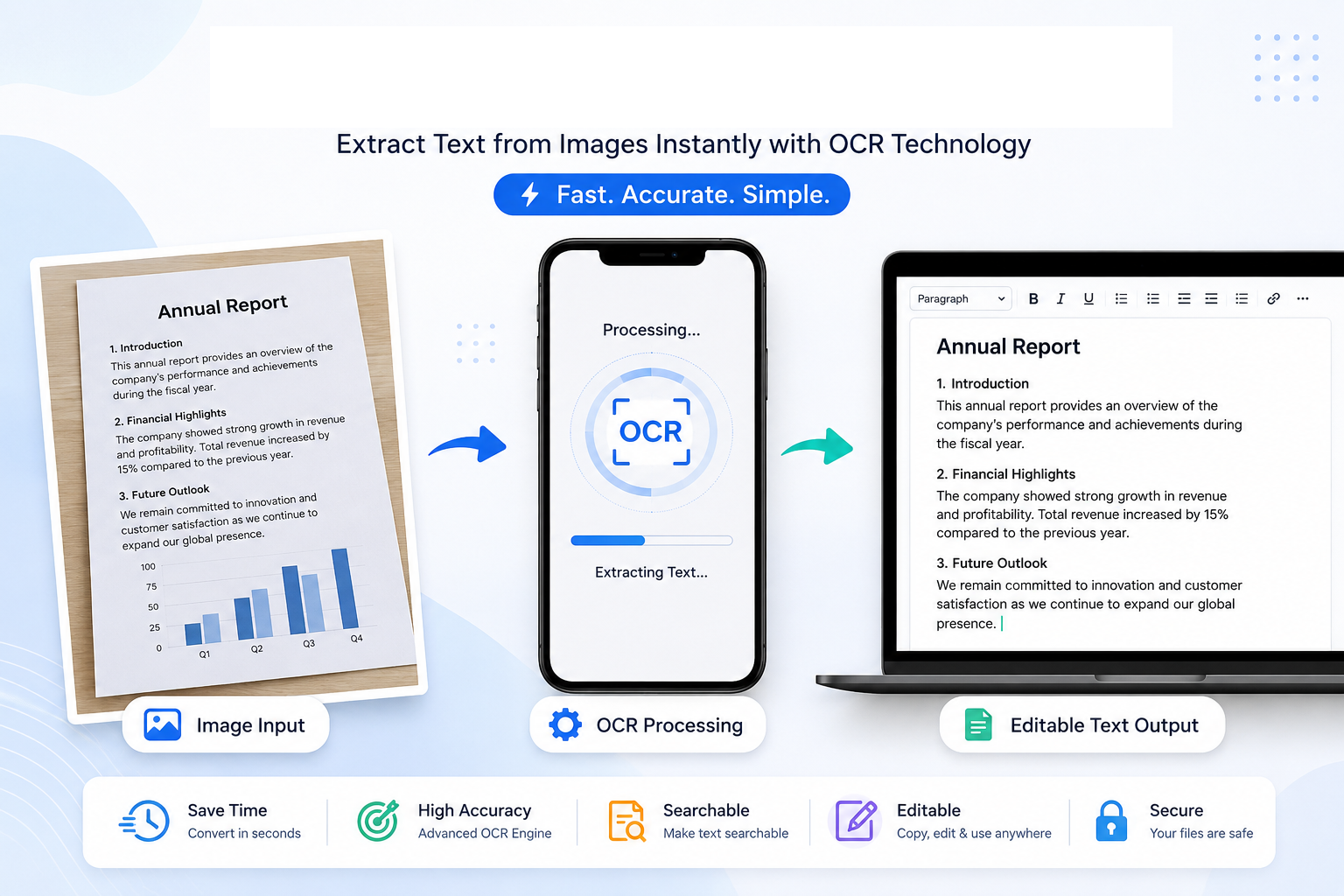
Imagine receiving an important document as a photograph on your mobile phone. It might be a contract from a client, handwritten notes from a classroom, a receipt needed for your accounts, or a page from a book that you want to quote in a report. The information is there, but because it exists only as an image, you cannot simply copy and paste the text. The only alternative seems to be typing everything manually.
For many years, this was exactly how people worked. Thousands of hours were spent retyping printed documents into computers. The process was slow, repetitive and, perhaps most importantly, prone to mistakes. A single typing error could completely change a name, an address or an important number.
Fortunately, technology has changed the way we work with documents. Today, an Image to Text Converter can analyse a photograph or scanned document, recognise the characters it contains and transform them into editable digital text within seconds. What once required patience and careful typing can now be completed automatically.
This remarkable process is made possible by a technology known as Optical Character Recognition, more commonly referred to as OCR. Although the name sounds highly technical, its purpose is surprisingly simple: it teaches computers how to recognise written characters in much the same way that humans read printed pages.
OCR has quietly become part of everyday life. Banks use it to process cheques. Libraries rely on it to digitise rare books. Businesses use it to archive invoices and contracts. Students convert printed notes into editable study material. Travellers translate road signs using their smartphones, while researchers extract quotations from scanned documents without having to type every word manually.
Many people use OCR every day without even realising it. Whenever you copy text from a photograph using your phone or search through a scanned PDF document, OCR is working behind the scenes.
The popularity of remote work has made OCR even more valuable. Documents are increasingly exchanged as photographs taken with mobile phones rather than professionally scanned files. Receipts are submitted electronically, handwritten meeting notes are shared through messaging applications and printed documents are archived digitally instead of being stored in filing cabinets.
In all these situations, the ability to transform an image into editable text saves valuable time and significantly improves productivity.
Why Converting Images to Text Matters
At first glance, typing a single page may not seem like a major task. However, imagine repeating that process every day. A business processing hundreds of invoices every month, a teacher preparing educational material, or a student organising an entire semester of notes could spend countless hours entering information manually.
An Image to Text Converter removes much of that repetitive work. Instead of recreating the content yourself, the software performs the initial conversion, leaving you to review and edit the result if necessary.
This offers several important advantages:
- It saves considerable time.
- It reduces typing errors.
- It makes printed information searchable.
- It allows documents to be edited electronically.
- It improves productivity for both individuals and businesses.
- It helps preserve historical and printed documents in digital form.
Beyond convenience, OCR also plays an important role in accessibility. Screen readers used by visually impaired people cannot normally read text that exists only inside an image. Once OCR converts that image into real digital text, assistive software can read the document aloud, making information accessible to a much wider audience.
What Is an Image to Text Converter?
An Image to Text Converter is a software application that analyses an image containing written characters and converts those characters into editable digital text. Instead of seeing only coloured pixels, the software attempts to identify individual letters, numbers and punctuation marks before reconstructing complete words and sentences.
The technology responsible for this process is called Optical Character Recognition (OCR). Modern OCR systems combine image analysis, pattern recognition and artificial intelligence to recognise printed text with impressive accuracy.
Although the process appears almost instant to the user, a great deal of analysis takes place behind the scenes. Before recognising any characters, the software first examines the quality of the image. It attempts to separate text from the background, improve contrast, remove visual noise and determine where each line begins and ends. Only after this preparation does the actual recognition process begin.
Each recognised character is compared against thousands of known patterns stored within the OCR engine. Modern systems also analyse neighbouring words to improve accuracy. Rather than recognising every letter in isolation, they consider the surrounding context to determine which word is most likely to be correct.
This combination of image processing and language analysis explains why OCR technology has become significantly more accurate than it was just a decade ago.
How OCR Has Changed Document Management
Before OCR became widely available, organisations depended heavily on manual data entry. Employees spent hours transferring printed information into computer systems, creating a workflow that was both expensive and time-consuming.
Today, OCR has transformed document management across almost every industry. A single scanner or mobile phone can digitise thousands of pages in a relatively short period, making those documents searchable, editable and much easier to organise.
Businesses archive contracts electronically. Hospitals digitise patient records. Universities preserve research papers. Government departments convert paper archives into searchable databases. Even small businesses benefit by processing receipts and invoices more efficiently.
What was once considered advanced technology has now become an everyday productivity tool available to anyone with access to a web browser.
How Does OCR Actually Work?
To many people, OCR appears almost magical. You upload a photograph, click a button and, within a few seconds, the words inside the image become editable text. Behind that seemingly simple process lies a sequence of sophisticated operations designed to mimic, in a limited way, how humans read printed documents.
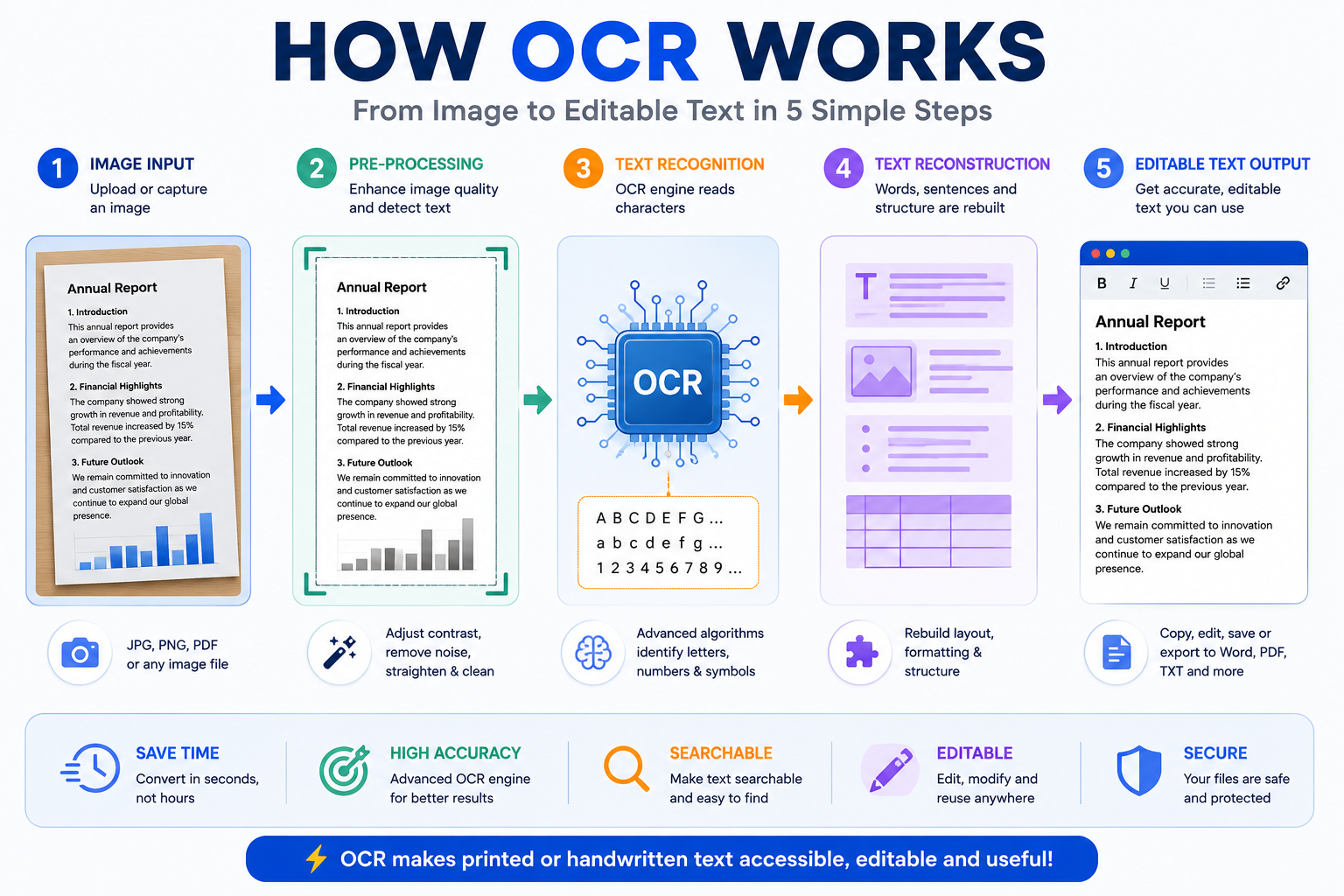
Figure 1: The five main stages of Optical Character Recognition (OCR), from image input to editable text.
Although different OCR systems use different techniques, most modern engines follow a similar workflow. Understanding these stages helps explain why some images produce excellent results while others require a little correction afterwards.
Step 1 – Image Acquisition
The first step is obtaining the image. It may come from a smartphone camera, a scanner, a screenshot or even a photograph downloaded from the internet. The quality of this original image has a major influence on the final OCR result.
A sharp, well-lit image gives the OCR engine far more information to work with than a dark, blurry photograph. This is why spending a few extra seconds taking a clear picture often saves several minutes of editing later.
Step 2 – Image Pre-processing
Before attempting to recognise any characters, the OCR software prepares the image. This stage is known as pre-processing.
During pre-processing, the software may:
- Increase the contrast between the text and the background.
- Remove small spots, dust or visual noise.
- Straighten slightly tilted pages.
- Sharpen blurred characters where possible.
- Convert colour images into black and white for easier analysis.
These adjustments improve the visibility of each character before recognition begins.
Step 3 – Text Detection
Once the image has been cleaned, the OCR engine searches for areas that actually contain text. Not every object inside a photograph is important. A picture might contain tables, logos, stamps, signatures, illustrations or decorative backgrounds.
The software attempts to distinguish genuine text from everything else, identifying paragraphs, headings, columns and individual lines of writing.
Step 4 – Character Recognition
This is the heart of OCR.
Each detected character is analysed and compared against thousands of known letter and number patterns. Earlier OCR systems relied mainly on pattern matching, comparing every shape to stored templates. Modern systems combine these traditional methods with artificial intelligence and machine learning, allowing them to recognise many different fonts, sizes and writing styles.
Rather than asking only, "What letter does this look like?", modern OCR systems also ask, "What word is most likely to appear here?" This additional language analysis greatly improves recognition accuracy.
Step 5 – Text Reconstruction
After recognising individual characters, the OCR engine rebuilds them into words, sentences and paragraphs. It attempts to preserve punctuation, spacing and the overall reading order of the original document.
Some advanced OCR applications even retain tables, headings and basic formatting, making the converted document easier to edit afterwards.
Why OCR Is Not Always Perfect
Although OCR technology has improved dramatically over recent years, it is important to understand that no OCR system is perfect.
Human readers use experience, common sense and context when interpreting unclear handwriting or damaged documents. Computers must rely entirely on the information available in the image.
If important details are missing, recognition accuracy naturally decreases.
Some common challenges include:
- Blurred photographs.
- Poor lighting.
- Very small text.
- Decorative or unusual fonts.
- Folded or damaged documents.
- Strong shadows across the page.
- Low-resolution screenshots.
- Messy handwriting.
Fortunately, most of these problems can be reduced simply by capturing a better image before uploading it.
What Makes OCR Accurate?
Many users assume that OCR accuracy depends only on the software. In reality, the quality of the original image often plays an even bigger role.
Imagine trying to read a road sign through heavy rain or thick fog. Even a person would struggle to identify every letter correctly. OCR faces exactly the same challenge.
The following factors have the greatest impact on recognition accuracy:
1. Image Resolution
Higher-resolution images contain more detail. Small letters remain sharp, allowing the OCR engine to distinguish similar-looking characters such as "O" and "0" or "I" and "1".
2. Good Lighting
Even lighting across the document helps the software separate text from the background. Harsh shadows or reflections can hide parts of individual letters.
3. Correct Alignment
A document photographed from directly above is much easier to analyse than one captured at an angle. Perspective distortion changes the shape of letters and may confuse the recognition process.
4. Clean Background
A plain background helps the OCR engine focus on the document itself. Busy backgrounds containing patterns or objects may interfere with text detection.
5. Clear Printing
Freshly printed documents generally produce excellent OCR results. Faded ink, damaged paper or photocopies made from photocopies become progressively more difficult to recognise accurately.
Where OCR Works Best
OCR performs particularly well when working with:
- Books.
- Letters.
- Reports.
- Invoices.
- Receipts.
- Business documents.
- Research papers.
- Printed forms.
These documents usually contain clear, well-organised text that modern OCR systems can recognise with high accuracy.
Where OCR Can Struggle
Certain types of documents remain challenging, even for advanced OCR systems.
- Untidy handwriting.
- Very old historical documents.
- Curved book pages.
- Stylised artistic fonts.
- Photographs taken in poor lighting.
- Images with heavy compression.
This does not mean OCR cannot process these images. It simply means that the extracted text may require additional proofreading and correction afterwards.
An Important Point to Remember
OCR should not be viewed as a replacement for careful proofreading. Instead, think of it as a productivity tool that performs the majority of the work for you. Even if a document requires a few small corrections after conversion, the time saved compared with manually typing every word is often considerable.
For most users, OCR transforms hours of repetitive work into just a few minutes of reviewing and editing, making it one of the most valuable document-processing technologies available today.
Practical Tips for Better OCR Results
Although modern OCR technology is remarkably accurate, the quality of the final result still depends greatly on the image you provide. By following a few simple recommendations, you can significantly improve recognition accuracy and reduce the amount of editing required afterwards.
1. Use the Highest Resolution Available
Whenever possible, capture or scan documents at a high resolution. More detail allows the OCR engine to distinguish similar-looking characters and recognise small text more accurately.
2. Keep the Camera Steady
A blurred photograph is one of the most common causes of OCR errors. Hold your phone steady or place the document on a flat surface before taking the picture.
3. Ensure Good Lighting
Natural daylight or evenly distributed indoor lighting usually produces the best results. Avoid strong shadows, glare and reflections on glossy paper.
4. Photograph the Document Straight On
Take the picture directly above the page rather than at an angle. This reduces perspective distortion and makes the text easier to recognise.
5. Crop Unnecessary Areas
If the image contains a large background around the document, crop it before processing. Removing unnecessary objects allows the OCR engine to focus on the text itself.
6. Use Clear Originals
Whenever possible, work from the original document instead of a photocopy of a photocopy. Every additional copy reduces image quality.
7. Review the Extracted Text
Even excellent OCR software can occasionally misread characters. Always proofread important documents before using them professionally.
Real-World Applications of OCR
OCR is no longer limited to large companies or government organisations. It has become a valuable productivity tool for people from many different professions.
Students
Students often receive printed notes, worksheets and textbook extracts. Instead of retyping them, OCR converts the material into editable text that can be highlighted, organised and searched more easily.
Teachers
Teachers frequently digitise examination papers, worksheets and classroom materials. OCR makes it easier to update existing documents without creating them again from scratch.
Business Owners
Invoices, quotations, purchase orders and receipts often arrive in printed form. OCR speeds up data entry and helps businesses maintain digital records.
Researchers
Academic research frequently involves analysing historical documents, journals and books. OCR allows researchers to search large collections of text instead of reading every page manually.
Accountants
Expense receipts and financial documents can be converted into searchable digital records, reducing paperwork and improving organisation.
Lawyers
Legal professionals often deal with large volumes of printed documents. OCR helps convert case files into searchable electronic archives.
Healthcare Professionals
Hospitals and clinics use OCR to digitise medical records, improving document management while reducing dependence on paper files.
Common OCR Mistakes
Understanding common OCR mistakes helps users know what to expect from the conversion process.
- Confusing the number "0" with the letter "O".
- Confusing the number "1" with the letter "I".
- Missing punctuation when the image quality is poor.
- Incorrect spacing between words.
- Difficulty recognising decorative fonts.
- Reduced accuracy on heavily handwritten documents.
Fortunately, these issues are usually easy to correct during proofreading.
Frequently Asked Questions
Is OCR the same as scanning?
No. A scanner simply creates a digital image of a document. OCR analyses that image and converts the visible text into editable characters.
Can OCR recognise handwriting?
Many modern OCR systems can recognise neat handwriting, although printed text generally produces more accurate results.
Which image format is best?
High-quality JPG and PNG images usually provide excellent OCR results. The most important factor is image clarity rather than the file format itself.
Can OCR process photographs taken with a mobile phone?
Yes. Modern OCR software is designed to work with smartphone photographs, provided the images are sharp and well lit.
Does OCR work offline?
Some applications perform OCR directly on your device, while others process images using cloud-based services. The available features depend on the software you choose.
How accurate is OCR?
With clear printed documents, modern OCR engines often achieve very high recognition accuracy. Poor image quality, unusual fonts and messy handwriting may reduce performance.
Can OCR recognise multiple languages?
Many OCR systems support numerous languages. The exact number depends on the OCR engine being used.
Can OCR extract text from screenshots?
Yes. Screenshots are often excellent candidates for OCR because the text is usually sharp and well defined.
Is OCR useful for businesses?
Absolutely. Businesses use OCR to process invoices, contracts, forms, receipts and many other printed documents, reducing manual data entry and improving efficiency.
Do I still need to proofread the text?
Yes. Although OCR is highly accurate, reviewing important documents is always recommended before using or sharing them.
Using the Write2Text Image to Text Converter
If you need a quick and straightforward way to extract text from an image, the Write2Text Image to Text Converter is designed to simplify the process. Simply upload your image, allow the OCR engine to analyse the content and review the extracted text. From there, you can copy, edit or save the information for use in reports, assignments, business documents or personal projects.
The tool is particularly useful when working with scanned documents, photographs, screenshots and other image files that contain printed text. Instead of spending valuable time retyping information, you can concentrate on editing and using the extracted content.
Conclusion
Optical Character Recognition has fundamentally changed the way we work with printed information. What once required hours of manual typing can now be accomplished in a matter of seconds. Whether you are digitising classroom notes, processing business documents, organising research material or simply copying text from a photograph, OCR offers a faster and more efficient way to work.
Like any technology, OCR performs best when it receives clear, high-quality images. Understanding how the recognition process works, preparing documents carefully and reviewing the extracted text afterwards will help you achieve the best possible results.
As OCR technology continues to evolve, it is becoming an essential productivity tool for students, professionals, businesses and everyday computer users alike. Learning how to use it effectively will save time, reduce repetitive work and make printed information far easier to manage in an increasingly digital world.
Next Step: Ready to convert your own images into editable text? Try the Write2Text Image to Text Converter and discover how quickly OCR can transform printed information into digital content.